How to handle 49.4C02 errors on HP Laserjet P3005 series

Have you ever facing the problem when your HP P3005n Laserjet Printer is returning 49.4C02 Errors on its control panel screen ?. Recently I got it and found the solution is very easy. My colleague was sent the printer to the vendor for fix but apparently he was asked to pay $250 to replace the printer main board. I said no and would be glad if he can pay me only a half of those price if I can fix his printer *grin* . The error occurs when users are trying to print from Adobe Acrobat Reader 9.x , however it is not always occurs on every documents that are opened with Adobe Acrobat Reader 9.x, hence only happened on few documents, depend on the content. So how is the solution ?.

HP LaserJet P3005n

The cause of the error is the firmware. You need to update your HP Laserjet's firmware to the latest one. HP confirmed their old firmware is having problem with Adobe Acrobat Reader 8.x, and probably any later version. To update your printer's firmware you need the firmware itself and firmware update utility from here . Extract the firmware update utility and the firmware. Copy the firmware, usually it has .rfu extension to the firmware update utility. Execute the firmware update utility and select the printer that need to be updated. Wait a few minutes for the uploading the firmware to the printer is processed. When the process is done, the printer control panel will be back to status READY. This indicating the firmware process is done. Now your printer is ready to print.


» Read more
September 18, 2010

Backup Outlook Express email with free Amic email backup

For most PC users, home computer user or small business computer user, backup for email is important, since not all email client provide this feature. Amic email backup is a free software that is designed to backup copy of emails database. It can save emails, address book, mail settings, mail and news accounts, message rules, blocked senders lists and signatures to a single, compact, compressed backup file that can be easily restored whenever necessary.

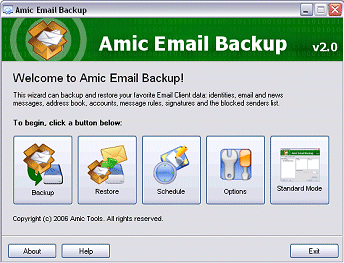
Outlook Express Email Backup with Amic Email Backup

With Amic email backup, backing up Outlook Express email is easy. Amic backup email can works in two working mode, a wizard mode and a standard mode and it can be set for auto backup the email using schedule option whether we want to backup daily, weekly or at any period of time intended.

Beside working with Outlook Express, Amic email backup is also works with other popular email clients such as Microsoft Outlook, Eudora, Netscape Messenger, IncrediMail and PocoMai etc.

The installation is simple, just download and open the file AmicEmailBackupSetup.exe and follow the installation wizards.


» Read more

October 12, 2008

Dictionary application for iPhone and iPod Touch from wordweb

Wordweb for iphone


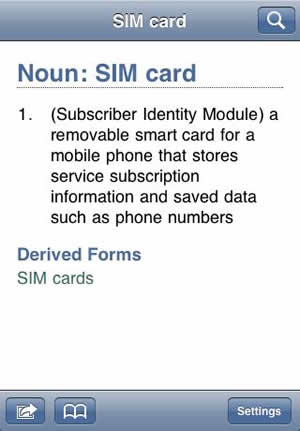
If you are looking for a dictionary program for an iPhone or for iPod Touch, this dictionary application from wordweb is a must application. Wordweb which is known for its comprehensive one-click English thesaurus and dictionary released its dictionary software for iPhone and iPod Touch. It claims to be uptodate international English dictionary based on wordweb and can works offline and
  • Has fast, simple navigation
  • Has synonyms and many usage examples
  • Has over 222,000 word senses, 370 000+ words including derived forms
  • Includes many proper nouns, compounds and phrases
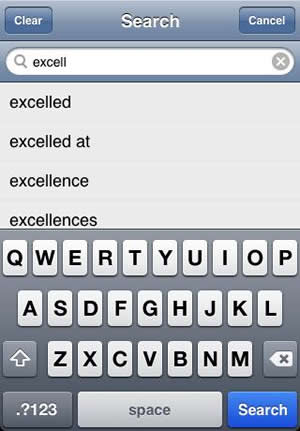
  • Has bookmark and recent words list feature
  • Includes full coverage of American, British, Canadian, Australasian and Asian English

wordweb for iphone search feature

The software is available for download from iPhone Application Store.


» Read more

October 9, 2008

Google logo of Large Hadron Collider


This logo of Google made me curious at first, until I found that the logo depicting Large Hadron Collider, a multi-billion dollar project that has been under construction since 2003. It has been installed in a 17-mile-round circular tunnel down under Swiss-French border and expected to complete and starts fully operating early next year. .

What is it actually ?, this beast is made in attempt to help human know what actually in God's mind in creating universe, be precisely the collider will helps scientists on studying particles and forces that yet unobserved, where collisions of beams of protons travelling at the speed of light will show what particles are created during collisions. The collider will re-create the rapidly changing conditions in the universe a split second after the "Big Bang", the beginning of the universe. Did you see how Google text are split on the logo when collision is happened?

more infor about the collider is here and here


» Read more

September 10, 2008

Studio Hybrid : unique, stylish and green desktop PC from Dell

Dell's Studio Hybrid is most unique and stylish Desktop PC yet greener PC in the market. Studio Hybrid designed in ultra compact design available in 6 interchangeable color sleeves and Bamboo to match your sense of style.


Environment friendly

Uses energy-efficient Intel® CoreTM 2 Duo Mobile Processors, Studio Hybrid consumes about 70% less power than a typical desktop PC and comply to Energy Star 4.0 with an 87% efficient power supply. The material are also made from 95% recyclable materials and comes with a system-recycling kit and has about 75% less printed documentation by weight compared to typical desktops.


It's Portable

As the design is about 80% smaller than standard desktops, this cutie is tends to be portable


» Read more

September 6, 2008

Ubiquity : control the web with language-based instructions


Recently Mozilla Labs announced the launch of Ubiquity, an experiment from Mozilla Labs to connect the web with language in attempt to provide new user interfaces that enables everyone to do common web tasks more quickly and easily.

Ubiquity is made to simplify tasks on Web interaction. As illustration Mozilla gave an example, there are lots of tasks you should do to send invitation to a friend for a meetup in a restaurant where in the invitation email you want to include the map of the restaurant so your friend easily find them as well as a review of the restaurant. All of these requires you to do many web tasks, composing on a web-mail service, finding the map on map site, copy the map image to the email or maybe just put the link of the map, searching review on search-engine, then paste the review to email or just put a link of it. Can you count how many clicks and windows involved ?.


Ubiquity to map a location

"Most people do not have an easy way to manage the vast resources of the Web to simplify their task at hand. For the most part they are left trundling between web sites, performing common tasks resulting in frustration and wasted time."

For those troublesome activities is Ubiquity made for, Ubiquity is made to explore how best to empower users to control the web with language-based intructions, enable on-demand, user-generated mashups with existing open Web APIs and at last it will extend the browser functionality easily. Ubiquity lets you define your own commands and share it for others.


To get the big picture of what Ubiquity, the above video explains it very well and to experience it just install Ubiquity. I have tested it for emailing , updating Twitter and searching the web, translating the web etc. In searching the web, it reminds me to search the web with Launchy.


Ubiquity to search the weather


Ubiquity to search a keyword in Wikipedia


» Read more

September 5, 2008

InPrivate: Anonymous Internet Browsing in IE8 Beta 2


Fear of your traces on web browser known by someone else ?. The next version Internet browser from Microsoft, Internet Explorer Version 8 (IE8) will includes new feature for privacy purpose. IE8 will enables you to surf the internet without leaving trace on your computer.The feature in this new Internet Explorer 8 Beta 2 called "Inprivate Browsing". Users privacy is always a big concern .

"Have you ever wanted to take your web browsing “off the record”? Perhaps you’re using someone else’s computer and you don’t want them to know which sites you visited. Maybe you need to buy a gift for a loved one without ruining the surprise. Maybe you’re at an Internet kiosk and don’t want the next person using it to know at which website you bank" , stated in IEblog.


InPrivate feature lets users control whether IE should keep your browsing history, cookies and other data , also it allows you to block a content of the page you visit as well as capability to blocking or allow lists of websites base on subscriptions.

So if you are using shared PC or in public PC, a borrowed laptop from a friend this feature is for you to not storing any browsing data such as history, temporary internet files, cookies and any other data intact on those computers.


This feature reminds me to the Stealther plug-in for Firefox which does the same thing and Google Chrome with Incognito mode browsing. And I strongly suggest to folks at Mozilla to made this feature by standard rather than rely on a plugin.

via IEblog


» Read more

September 4, 2008

Double-sided touch panel display prototype introduced

A double-faced touch panel display recently exhibited at Sign & Display Show 2008 , 28 - 30 Aug in Tokyo, Japan. The dual-faced display by Teraokaseiko Co Ltd was made by attaching a resistive touch panel to the both sides of a transparent inorganic EL panel. The prototype is an orange monochrome display with is 256 x 120 pixels, that can be touched at either both sides.


So what this thing is best for ? Teraokaseiko expects the dual-faced touch display will be suits for mapping software where users can touch the back side of the display to operate it without hiding a part of the map with their fingers and chance two users of gamer facing each other can play a game by using both sides of the display. Sound cool.

via techon


» Read more

September 3, 2008

Google Chrome first encounter


I have downloaded Google Chrome beta this morning and haven't tried until this afternoon. Installation is straight and easy, a file sized about 475 Kilobytes was downloaded and running the file will do the installation. When install is finish you are offered to import from its big brother, existing Mozilla Firefox. However you can just skip the import process.

This afternoon I tried to browse with Google chrome for small Google Chrome review. First impression I got was, the screen is so clean and tidy and fast initialization. There are no cluttered buttons. Bottom area of the browser is naked free from buttons and space for status bar and any other common thingy on a browser bottom. This uncluttered screen area gives wider point of view, especially for one with average monitor size. However, since the extension for Google Chrome is not available at the moment, I think when the time is come for extensions, this clean appearance will be populated by buttons.

Clever solution from folks at Google is for the status bar that is only appears when mouse is hovering the links on the page. This solution provides more space for the content of the browser. As I wrote in previous post that Chrome is isolating each tab to prevent crashing another tab. This feature is represented by the Task Manager on Google Chrome, hence just like Windows task manager, when you found one tab that is freezing, with task manager you can easily kill the tab without losing other tabs. The feature that I like the most from Google Chrome. I've always having trouble with freezing Firefox tabs and ended with losing all opened tabs.


On tab browsing side I found there is no button to switch to previous or next tab ( very useful when opening lost of tabs ), however keyboard shortcuts Ctrl-Shif-Tab and Ctrl-Tab is enough for solution. Opening computer files can be done through three ways, by pressing Ctrl-O , dragging the file onto Chrome window and by common browsers solution, typing the file path on address bar. Searching internet can be done easily by typing keywords in address bar. It is automatically search the internet with preferred search engine you like. The default search engine uses for this searh feature can be set and managed through the options menu, whether you like Google, Yahoo or any other search engine. Bookmarking can be done by pressing Ctrl-D, pressing star button beside address bar and dragging the page link onto the bookmarks tab that is activated and toggled by pressing Ctrl-B. Creating folders on bookmarks tab is easy and will appears on bookmarks tab. By showing folders on bookmarks tab this way, accessing bookmarks is even easier.


Overall Google Chrome is quite satisfying, despite some lacks at some points, it is acceptable as this is beta version. I couldn't comment of the speed of Google Chrome on browsing the page as I run it on shared connection where I found the speed is average comparing with Firefox on the same condition. At the other hand, following the hype, at the first day of beta release, techcrunch reported that Getclicky web analytic says that almost 2% of all traffic to 45,000 sites they monitored is coming from Google Chrome; quite interesting


Lets hoping the final release will have lots of improvements and heading the way to better browsing experience with Google Chrome.


» Read more

September 2, 2008

Ups ... Microsoft did it again : PageUp and PageDown keys patented


Photo by bitterjug

It seems Microsoft is racing approaching 10,000 mark for their US Patent. At the other hand, Microsoft has a long story for its patents that are many argue about it , or can sometimes demonstrate or were based on earlier work carried by others or common basic self-evident idea. One example is patent on mouse wheel that can scroll up and scroll down .

And now Microsoft did it again with Page Up and Page Down keystrokes, the patent was granted on August 19 under US patent number 7,415,666 " Method and system for navigating paginated content in page-based increments " and was applied for the patent in 2005. For your information, Page Up and Page Down buttons have been in existence since the beginning of personal computer.

The Patent abstract for this patent stated :
A method and system in a document viewer for scrolling a substantially exact increment in a document, such as one page, regardless of whether the zoom is such that some, all or one page is currently being viewed. In one implementation, pressing a Page Down or Page Up keyboard key/button allows a user to begin at any starting vertical location within a page, and navigate to that same location on the next or previous page. For example, if a user is viewing a page starting in a viewing area from the middle of that page and ending at the bottom, a Page Down command will cause the next page to be shown in the viewing area starting at the middle of the next page and ending at the bottom of the next page. Similar behavior occurs when there is more than one column of pages being displayed in a row.
via zdnet


» Read more